TempoFlow: Minimal Android Rhythm Sketchpad for Quick Beats
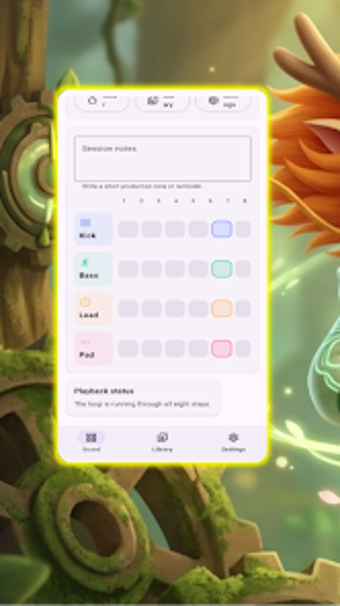
TempoFlow, developed by Aboahmedd, is a compact Android rhythm sketchpad built to capture short beat ideas on the go. The app converts a small step grid into an editable loop, with tempo controls and a preview loop for instant playback and adjustment. It bundles a local library, session notes, and simple editor settings, giving casual musicians and aspiring beat makers a lightweight, private tool for fast rhythm experimentation.
What kind of game is TempoFlow?
You drop into a tiny step grid and your immediate task is to shape repeating grooves, so each tap toggles a beat and affects the loop. The app functions as a minimalist rhythm sandbox rather than a full-featured workstation. Its core loop is creation, audition, and save: build layered patterns, listen via the preview loop, then store ideas in the local library for later retrieval.
Designed for solo experimentation rather than shared sessions
So, multiplayer and cloud sync do not figure in the design; the app emphasizes local use. The mechanics focus on precise cell toggling and real-time tempo adjustment. Key interactive elements include:
- Compact step grid for layered patterns
- Adjustable tempo for speed changes
- Preview loop for immediate playback
What does the game look and sound like?
The interface keeps visual clutter to a minimum, so the step grid and beat numbering remain central. Audio feedback comes through the looped preview, which helps you hear how patterns interlock as you edit. Editor settings let you change grid density and numbering to match preference. The app's lightweight nature targets a broad range of Android devices, keeping performance demands low during looped playback.
Is it hard to get started and what keeps you coming back?
Thus, onboarding is immediate: tap cells to create beats and use tempo controls to test feel, so learning takes only a few minutes. Session notes and the local library encourage returning to fragments and refining them. The minimalist scope rewards short, iterative sessions rather than long production runs, which makes the app most appealing to users who value quick idea capture and repeated experimentation.
TempoFlow suits quick sketching but not deep production work
TempoFlow is an effective choice for casual beat makers who prefer short creative bursts and iterative loop work. Players seeking deep arrangement, mixing, or export-heavy workflows should expect limitations due to the app's focused design. TempoFlow best serves those who want a lightweight, device-centered place to capture rhythmic ideas quickly, rather than a replacement for a full production environment.